Thermometer Tool
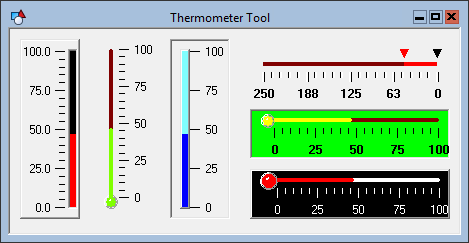
 A Thermometer Tool object shows a value within a given range in essentially a linear gauge. The default Style is a vertical bulb (thermometer). The range is defined by the PositionMin and PositionMax properties of the object. The indicator fill level is set by the Position property. In Edit mode, you can assign a default value to this property. If the object is associated with a point, the default value is replaced in Run mode by the actual value of the point.
To associate the object with a point use the point identifier properties to form a fully qualified CygNet tag string. The point identifier properties are [1:SiteService], [2:Point ID], [3:Long Point ID], [4:Facility ID], and [5:UDC]. If the object is on a templated screen, only use the [5:UDC] property.
In addition to indicator fill level, the object has built-in pointers to show the minimum and maximum values recorded by the gauge since the screen has been in Run mode. These pointers are enabled using the ShowMinPointer and ShowMaxPointer properties. The CurrentMin and CurrentMax properties specify the values for the pointers. Although you can specify a default value for each pointer in Edit mode, the value will be reset in Run mode when the Position value changes. CurrentMax records the highest Position; CurrentMin records the lowest.
The orientation of the object can be vertical or horizontal. If you change the orientation you will also have to adjust the object’s boundary to match. The scale can go left-to-right, right-to-left, top-to-bottom, or bottom-to-top. The scale is reversed using the ReverseScale property. The number, length, precision, and color of the tick marks can be configured.
The [AlarmElement] property can be set to show the point state color in the object’s Background Color, Indicator Color, the Indicator Background Color, or not at all (None). When set to None, the color specified for each component is shown. If set to one of the other options, the component color is replaced with the point state color.
The [UseCustomStateColors] property enables the object to use its own custom point state colors. If set to 1 - Yes, the colors used are those defined by the object’s [CustomStateColors] property. If set to 0 - No, the colors are those defined by the TheView’s [CustomStateColors] property.
More:
 Thermometer Tool - Properties, Events, and Methods
Thermometer Tool - ActiveX Properties
Thermometer Tool - Dynamic Configuration of ActiveX Properties

